Let AI edit your shorts: what Submagic does, what it costs, and the one catch
You film fast. Editing is what makes you skip a day. Here's what Submagic can take off your plate — cutting pauses and bad takes, zooms, B-roll, clean audio, eye contact — what each one costs, and what to know before you try it.

Affiliate disclosure: this page contains affiliate links. If you sign up for a paid plan through them, we earn a commission.
In this guide · 8 sections
01Who this is for
You post short-form videos — or you want to post them every day — and filming isn't the problem. Editing is. Cutting the pauses, the restarts and the "um"s, adding zooms so it doesn't feel flat, making the audio sound decent: that's the hour that turns "post today" into "post tomorrow."
This page shows which of those jobs Submagic can take over, what each costs, and what to check before you pay.
02Before you start: trial, renewal, refunds
- Free to try, no card. Submagic's pricing page says "No credit card required."
- The trial can't export (on our account). Pressing Export opened "Your video is ready. Choose a plan to export it." What we saw.
- Plans renew automatically. To stop: your profile → Access Stripe Portal → Manage plan → cancel plan. You can also pause instead.
- No refunds. Submagic's help center says it doesn't offer refunds. If you're unsure, pay monthly for the first month rather than yearly.
03The editing jobs Submagic can take over
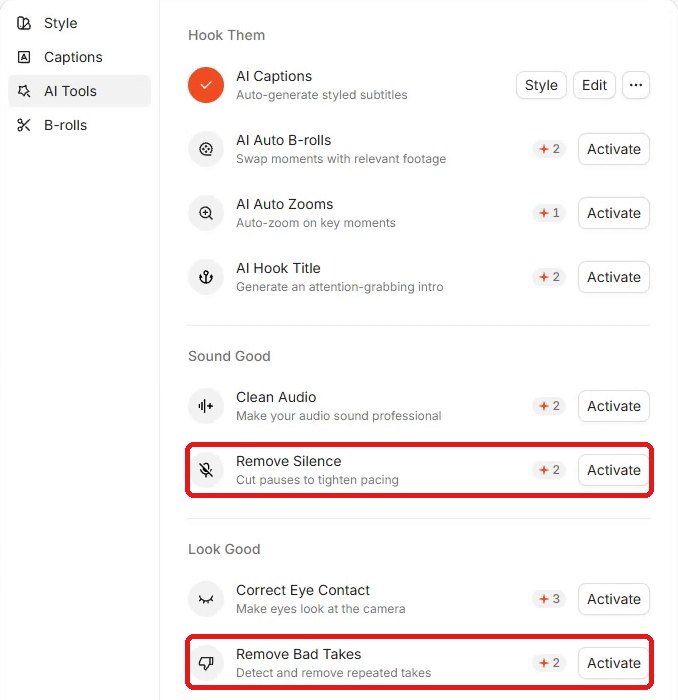
This is the AI Tools panel in Submagic's editor, as it appeared on our trial account. Each tool has an Activate button and a credit cost; uploading a video costs 3 credits and exporting is free.
| Editing job | Submagic tool | Credits | Plan |
|---|---|---|---|
| Cut long pauses | Remove Silence | 2 | Pro |
| Cut restarts / repeated takes | Remove Bad Takes | 2 | Pro |
| Make audio sound cleaner | Clean Audio | 2 | Pro |
| Zoom in on key moments | AI Auto Zooms | 1 | Pro |
| Fix eyes reading a script | Correct Eye Contact | 3 | Pro |
| Add a hook title at the start | AI Hook Title | 2 | Pro |
| Cover cuts with footage | AI Auto B-rolls | 2 | Starter: free B-roll · Pro: Storyblocks B-roll |
| Styled captions | AI Captions | 0 | All plans |
| Long video → several shorts | Magic Clips | 8 per clip | Check the pricing page |
Plan column from Submagic's pricing page (November 6, 2026). Credit costs from the editor and Submagic's credit table.
04Cut pauses and bad takes
This is the edit that eats the most time if you talk to camera. In the editor, Remove Silence is described as "Cut pauses to tighten pacing" and Remove Bad Takes as "Detect and remove repeated takes." The pricing page also lists removing filler words on Pro.
Both are Pro features and cost 2 credits each per video. We haven't run them on our own clip yet, so we can't tell you how well they catch every restart — try them on one real video first.
05Zooms, B-roll and a hook title
AI Auto Zooms ("Auto-zoom on key moments", 1 credit, Pro) keeps a single-camera shot from feeling flat. AI Auto B-rolls ("Swap moments with relevant footage", 2 credits) covers jump cuts; Starter includes free B-roll, Pro adds Storyblocks footage. AI Hook Title (2 credits, Pro) adds a title at the start.
06Sound and eye contact
Clean Audio ("Make your audio sound professional", 2 credits, Pro) is for rooms with echo or background noise. Correct Eye Contact ("Make eyes look at the camera", 3 credits, Pro) is for when you read a script off-camera. Neither is on Starter.
07Captions — the part we've tested
Captions are free in credits and on every plan. On our 26-second test short, they were ready about 16 seconds after we dropped the file in, and you switch the whole style in one click. See the 3-step captions setup with screenshots.
08Which plan fits
| Plan | Monthly | Billed yearly | What you get |
|---|---|---|---|
| Starter | $19 | $12/mo | Captions, free B-roll, ~15 videos/mo, up to 2 min, 1080p, no watermark |
| Pro | $39 | $23/mo | Everything above + remove silences & bad takes, clean audio, auto zooms, eye contact, hook title; ~40 videos/mo, up to 5 min |
Rule of thumb: if captions are all you need, Starter is enough. If the hour you want back is cutting pauses and restarts, it's Pro — and with no refunds, test it on one real clip during the trial before you pay.
Try Submagic's editor free →No credit card to start · cancel anytime from Manage planWe've tested captions and styles on Submagic's free trial. We haven't activated the other AI tools yet, so their descriptions above are Submagic's own; prices and plan details are from Submagic's pricing page and help center, checked November 6, 2026.
FAQ
Q. Which Submagic plan removes silences and bad takes?
Pro. On Submagic's pricing page (checked November 6, 2026), Starter doesn't include removing silences and bad takes, clean audio, auto zooms, the hook title or eye contact correction; Pro does. Pro is $39 a month, or $23 a month billed yearly.
Q. How many credits do Submagic's AI tools use?
In the editor we saw: Auto Zooms 1, Auto B-rolls 2, Hook Title 2, Clean Audio 2, Remove Silence 2, Remove Bad Takes 2, Correct Eye Contact 3. Uploading a video costs 3 credits, captions are free, and exporting doesn't use credits. Magic Clips (long video to shorts) costs 8 credits per clip.
Q. Can I try these tools on the free trial?
The trial starts without a credit card, and in our trial editor every AI tool showed an Activate button with its credit cost. We haven't activated them yet, so we can't confirm they all work on the trial. On our trial account, Export opened a plan picker, so you can't download the result without a plan.
Q. How do I cancel Submagic?
From your profile, open Access Stripe Portal, then Manage plan, then cancel plan. You can also pause the subscription. Submagic says it doesn't offer refunds.
Read next
Captions for faceless shorts, without typing a wordThe caption tool I use for faceless shorts and the 3-step setup: drop in a video, pick a style, fix any word. What the free trial can and can't do (it can't export), and which plan to pick — prices checked November 6, 2026.Submagic free trial: can you export without a watermark? What we saw (2026)We tried Submagic's free trial: captions and preview worked, but every Export opened a 'Choose a plan to export it' screen. Here's what the help center says, the cheapest watermark-free plan ($12/month billed yearly), and what to test before you pay — there are no refunds.9 free alternatives to paid tools for faceless shorts (2026)Jasper, ElevenLabs, Submagic, OpusClip, Storyblocks, Premiere, Later, Camtasia and Canva Pro all have a free swap. Here's each paid price (US, checked November 6, 2026), the free alternative, and the real limit of the free version.- Submagic pricing
- Submagic: How Many Credits Does Each Feature Cost?
- Submagic: Does Submagic have a Free Trial
- Submagic: How do I cancel my plan?
- Submagic: Do you have a refund policy?
- Submagic: Size and Video Length Limit
The AI Tools list and credit costs were captured in our Submagic trial editor on November 6, 2026. Plans and prices were checked on Submagic's pricing page and help center the same day. We have tested captions and styles on the trial; we have not yet activated the other AI tools, so their results here come from Submagic's own descriptions.