
Submagic free trial: can you export without a watermark? What we saw (2026)
Affiliate disclosure: this page contains affiliate links. If you sign up for a paid plan through them, we earn a commission at no extra cost to you.
You uploaded your short, the captions popped in word by word, you picked a bold style and fixed two typos. It looks ready to post. You press Export — and instead of a download, you get a pricing table. Here's exactly what that screen shows, what the trial is actually for, and how to choose a plan without paying for more than you need.
What happened when we pressed Export
We signed up for Submagic with no credit card and uploaded one test clip: a 26-second faceless short narrated by a text-to-speech voice. Submagic generated captions on it, and we could switch between caption templates and play the preview. Uploading used 3 credits (our trial balance went from 15 to 12).
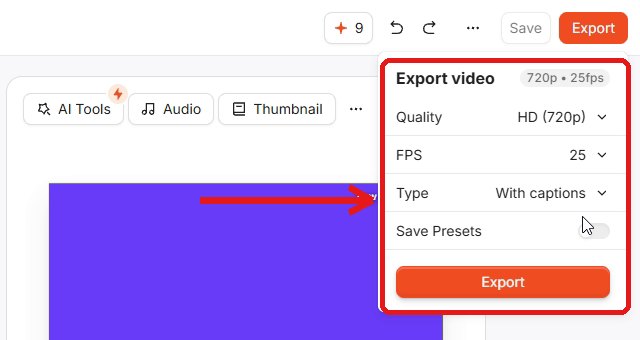
Then we opened Export. The menu offers Quality, FPS and Type (with captions, or subtitles only on a colored background). We tried three times with different settings — 1080p, 720p at 25 FPS, and other options.
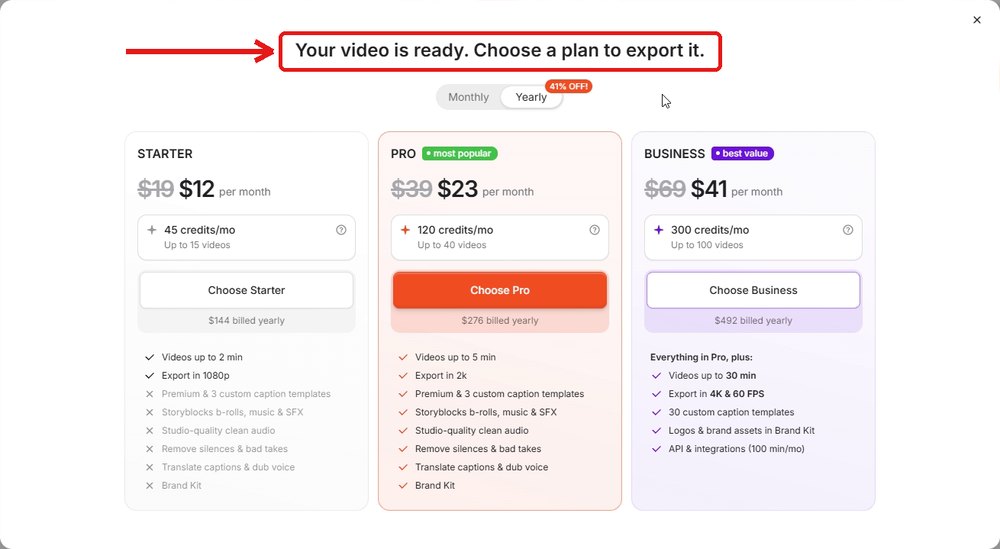
Every time, the same window opened: "Your video is ready. Choose a plan to export it." It listed Starter, Pro and Business with a Monthly/Yearly switch. There was no "download with watermark" button and no free option on that screen.
What Submagic's help center says — and where it doesn't match
Submagic's help article "Does Submagic have a Free Trial" (updated October 28, 2026) says you can upload 3 short videos for free and edit them, and that if you choose a subscription, you'll be able to download without a watermark. Many review sites read that as "the trial exports with a watermark."
That's not what we saw. Two things didn't line up on our account:
- Export: we never got a watermarked file. Export went straight to the plan picker.
- Trial size: the help article says 3 videos; our account started with 15 credits, and one upload cost 3 credits — enough for about 5 uploads.
Trial rules can differ by account or change over time, so treat our result as one data point from November 5, 2026. The safe assumption: plan on paying if you need the file.
What to check during the trial before you pay
Submagic's help center says it does not offer refunds. So the trial is your only chance to find deal-breakers. Use it on one of your real clips, not a demo:
- Caption accuracy. Play the whole preview and count how many words you'd have to fix — especially names, slang and numbers. If your shorts use an AI voice, test that voice.
- The style you actually want. On the plan picker we saw, Starter has "Premium & 3 custom caption templates" crossed out; the pricing page lists Standard caption templates for Starter and Premium for Pro. If the look you like is a premium one, budget for Pro.
- Clip length. Starter accepts videos up to 2 minutes, Pro up to 5, Business up to 30 (help center). Most shorts fit in Starter.
- The extras you'd use. AI captions are free in credits, but auto zooms (+1), remove silences (+2), B-rolls (+2) and hook titles (+2) add to the 3 credits per upload. Removing silences and bad takes is a Pro feature.
Which plan fits how often you post?
Credits come off when you upload; exporting is free (Submagic's credit table). An upload with captions only costs 3 credits.
| Plan | Monthly | Billed yearly | Credits / month | Captions-only uploads | Max length · quality |
|---|---|---|---|---|---|
| Starter | $19 | $12/mo ($144) | 45 | ≈ 15 (about 3–4 a week) | 2 min · 1080p |
| Pro | $39 | $23/mo ($276) | 120 | ≈ 40 (about 9–10 a week) | 5 min · up to 2K |
| Business | $69 | $41/mo ($492) | 300 | ≈ 100 | 30 min · up to 4K, 60 FPS |
All three are listed as "No watermark." Prices are per member. If you add extras, you get fewer clips: upload plus auto zooms is 4 credits, so Starter's 45 credits cover about 11 clips instead of 15.
Rule of thumb: posting up to 3 short clips a week with simple captions → Starter. Posting daily, or you want silence removal and premium styles → Pro. If you're unsure, pay monthly for the first month; yearly saves up to 41% but you can't get that money back.
Don't want to pay? Free captions inside each app
If you post each short to one platform and the default look is fine, the platforms caption for free:
- TikTok: on the edit screen after uploading, tap Captions; TikTok transcribes the speech and you can edit lines before posting.
- YouTube Shorts: Shorts made with the Clips and Shorts tool in YouTube Studio get autocaptions where available, and you can change their color, font and position.
- Instagram Reels: the free Edits app has a caption tool with style and transcription settings.
The catch: those captions stay inside each app, so posting one short to three platforms means captioning it three times, and the style won't match. Submagic's value is one styled MP4 you can post anywhere.
How to cancel later
From your profile, go to Access Stripe Portal → Manage plan → cancel plan. Submagic's help center says you can also pause the subscription for a few months instead of canceling.
We tested only the free trial, on one 26-second test clip, and we haven't paid for Submagic — so we haven't seen a paid export ourselves. Plan prices and features above are from Submagic's pricing page and help center (checked November 6, 2026).
Test Submagic's captions on one of your clips →Free trial · no credit card · watermark-free export from Starter ($12/mo billed yearly)Comparing tools first? See OpusClip vs Submagic or CapCut auto captions now need Pro?
FAQ
Q. Can you export a video on the Submagic free trial?
Not on our trial account. On November 5, 2026 we pressed Export three times with different settings (1080p, 720p at 25 FPS, and other options), and each time Submagic showed a screen that said "Your video is ready. Choose a plan to export it." with the Starter, Pro and Business plans. There was no button to download the video for free.
Q. Does the Submagic free trial add a watermark?
Submagic's help center says you can upload 3 short videos for free and that a subscription lets you download them without a watermark. On our account we never got a watermarked file, because Export went straight to the plan screen. All three paid plans are listed as "No watermark" on the pricing page.
Q. How many videos does the Submagic free trial include?
The help center says 3 short videos. Our trial account started with 15 credits, and uploading one video used 3 credits (15 → 12). Exporting itself costs no credits, according to Submagic's credit table.
Q. What is the cheapest Submagic plan without a watermark?
Starter: $19 a month, or $12 a month billed yearly ($144 a year). It includes 45 credits a month (about 15 videos), clips up to 2 minutes, and 1080p export. Pro is $39 a month or $23 a month billed yearly.
Q. Does Submagic give refunds?
No. Submagic's help center says it does not offer refunds. That's why it's worth testing captions on one of your real clips during the trial before you subscribe.
Q. How do I cancel Submagic?
From your profile, open Access Stripe Portal, then Manage plan, then cancel plan. Submagic's help center says you can also pause a subscription for a few months instead.
- Submagic: Does Submagic have a Free Trial
- Submagic pricing page
- Submagic: How Much Does It Cost To Use Submagic
- Submagic: How Many Credits Does Each Feature Cost?
- Submagic: Size and Video Length Limit
- Submagic: In What Quality Do The Videos Get Exported
- Submagic: Do you have a refund policy?
- Submagic: How do I cancel my plan?
- TikTok Support: Accessibility for your videos
- YouTube Help: Video Clips & Shorts in YouTube Studio
- Instagram Help: Add text or captions to your video on Edits
Submagic free trial tested on our own account on November 5, 2026 (one 26-second test clip). All official pages checked November 6, 2026. We haven't paid for Submagic, so we haven't seen a paid export ourselves. Prices and trial rules change — confirm on the official page before subscribing.