
CapCut auto captions now need Pro? What we saw, what it costs, and your options (2026)
Affiliate disclosure: this page contains affiliate links. If you sign up for a paid plan through them, we earn a commission at no extra cost to you.
The stream ended an hour ago. You've already cut this week's three best moments, lined them up in CapCut, and all that's left is captions — the step that used to take one click. Now the button has a little "Pro" tag on it. Before you pay $19.99 a month just to get that click back, here's what changed and what else you can do.
What we saw in CapCut
On CapCut desktop for Mac with a free account, we opened Text → Auto captions. The source language picker works, but the Generate button shows a Pro badge, and the bilingual captions option is marked as a paid feature too. The plain Add text tool had no Pro badge. We didn't check the mobile app, so it may look different there.
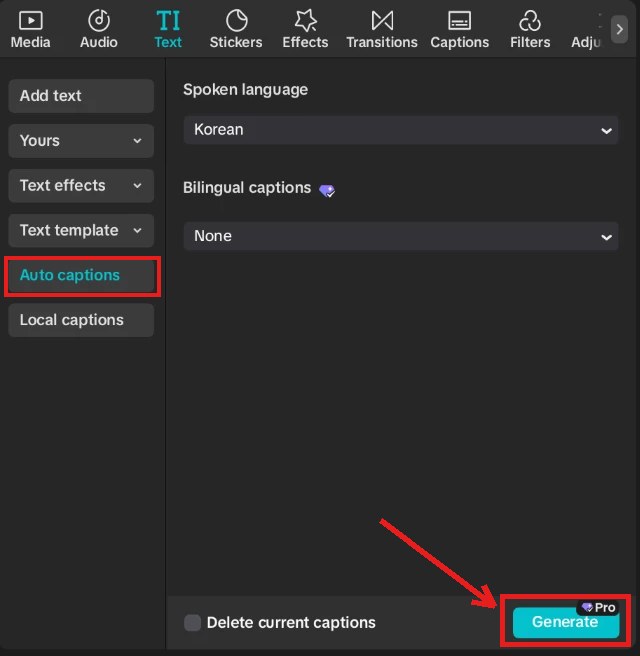
CapCut's own help page explains the rule. If a Standard (free) user sees a Pro prompt, the feature they used — auto captions is the example it gives — includes Pro-only functionality. You can try Pro features while editing, but export asks you to upgrade. The help page's advice for staying free is to remove anything with the Pro icon or swap in a free alternative.
Your options, side by side
| Option | Cost | Good for | Catch |
|---|---|---|---|
| CapCut Pro | $19.99/mo or $179.99/yr | You edit full timelines in CapCut anyway | Paying for a whole editor if you only want captions |
| The platform's own captions | Free | You post each clip to one platform | Redo them on every app; less style control |
| Type captions in CapCut | Free | A few short clips a month | Slow: you transcribe and time every line |
| Submagic | $19/mo ($12 yearly) · Pro $39 ($23) | You want styled, burned-in captions on many clips, fast | Clip length limit: 2 min (Starter), 5 min (Pro) |
Free: use each platform's built-in captions
- TikTok: on the edit screen after uploading, tap Captions. TikTok transcribes the speech, and you can edit each line before saving. TikTok also adds auto-generated captions to uploads by default.
- YouTube Shorts: if you make the Short with the Clips and Shorts tool in YouTube Studio, autocaptions are added where available, and you can change their color, font and position from Captions in the Shorts preview. YouTube notes that automatic captions come from machine learning and can contain mistakes.
- Instagram Reels: Instagram can create closed captions automatically. Its free Edits app also has a caption tool where you choose the spoken language, the caption style and transcription settings.
The trade-off: these captions live inside each app. If you post the same clip to TikTok, Shorts and Reels, you caption it three times, and the look won't match across platforms.
What a week of clips costs
For a creator who streams or records once a week and posts 3–4 clips from it (about 12–16 clips a month):
| Plan | Monthly | Billed yearly (per month) | Clips a month |
|---|---|---|---|
| CapCut Pro | $19.99 | $15 ($179.99/yr) | Not limited by clip count |
| Submagic Starter | $19 | $12 | ≈ 15 (45 credits, up to 2 min each) |
| Submagic Pro | $39 | $23 | ≈ 40 (120 credits, up to 5 min each) |
Submagic counts videos, not minutes: each upload costs 3 credits, AI captions are free, and extra AI features cost 1–3 credits each, so heavier editing means fewer clips (Submagic help center). Starter is just enough for 3–4 clips a week. If you post more often or your clips run longer than 2 minutes, it's Pro.
Which one should you pick?
Stay with CapCut and pay for Pro if you already build every clip on a CapCut timeline: cuts, zooms, music, sound effects. You'd be paying for the whole editor, and captions are one part of it.
Use the free platform tools if you post each clip to only one app and the default caption look is fine for you.
Try Submagic if your clips are already cut (from Twitch's clip button, OBS replay buffer or a clipping tool) and captions are the slow part. You upload the clip, pick a caption template, fix any typos and export one MP4 that works on every platform. It also adds B-roll, zooms and a hook title if you want them.
We haven't run Submagic on our own clips yet; the numbers here come from its pricing page and help center. Submagic says it doesn't offer refunds, so use the free trial (3 short videos, no credit card) on one of your real clips before you subscribe.
Try Submagic on one of your clips free →3 short videos · no credit card · watermark-free export on paid plans (official site)Still need to cut clips out of a long stream first? See how to clip Twitch VODs or OpusClip vs Submagic.
FAQ
Q. Are CapCut auto captions free anymore?
Not on our free account. On CapCut desktop for Mac (checked November 6, 2026), the Generate button under Text → Auto captions shows a Pro badge. CapCut's help center says that if a Standard user sees a Pro prompt, the feature they used — such as auto captions — includes Pro-only functionality, and exporting a project with Pro features requires Pro. We didn't check the mobile app.
Q. How much is CapCut Pro?
CapCut lists Pro at $19.99 a month or $179.99 a year for individual users (USD). The pricing page also shows first-month offers, and prices differ by country, so check the price shown in your app.
Q. Can I export without Pro if I already generated captions?
According to CapCut's help center, you can preview Pro features while editing, but export asks you to upgrade. To export on the free plan, remove anything marked with the Pro icon or replace it with a free alternative.
Q. What's the cheapest way to keep captions on my clips?
If you only post to one platform, its own caption tool is free: TikTok's creator captions, YouTube Studio's Clips and Shorts autocaptions, or Instagram's Edits app. If you need burned-in, styled captions you can post anywhere, a caption-only tool like Submagic starts at $19 a month ($12 a month billed yearly) for about 15 clips.
Q. Does Submagic have a free trial?
Yes. Submagic's help center says you can upload and edit 3 short videos for free, and the pricing page says no credit card is needed. Watermark-free downloads require a paid plan, and Submagic says it doesn't offer refunds.
- CapCut Help: Why Am I Prompted to Join CapCut Pro as a Standard User?
- CapCut: CapCut Standard vs Pro (pricing)
- CapCut pricing page
- TikTok Support: Accessibility for your videos
- YouTube Help: Video Clips & Shorts in YouTube Studio
- YouTube Help: Use automatic captioning
- Instagram Help: Manage closed captions for your reels
- Instagram Help: Add text or captions to your video on Edits
- Submagic pricing page
- Submagic How Much Does It Cost To Use Submagic
- Submagic Video Length Limit
- Submagic Does Submagic have a Free Trial
- Submagic Do you have a refund policy?
CapCut desktop checked on a free account on November 6, 2026. All official pages checked November 5–6, 2026. We haven't tested Submagic on our own clips yet. Prices and features change — confirm on the official page before subscribing.